How to Use Word Finder for Wordle Unlimited | Free Play Guide
Master the Word Finder tool for Wordle unlimited free play. Learn step-by-step how to solve puzzles faster with this free word puzzle helper.
Wordle unlimited has taken the world by storm, offering endless word puzzle fun for players everywhere. When you want to enhance your wordle free play experience, the word finder tool becomes your secret weapon. This comprehensive guide shows you exactly how to use this powerful free word puzzle helper to solve any challenge in seconds. For more word strategies, check out our guide on best starting words.
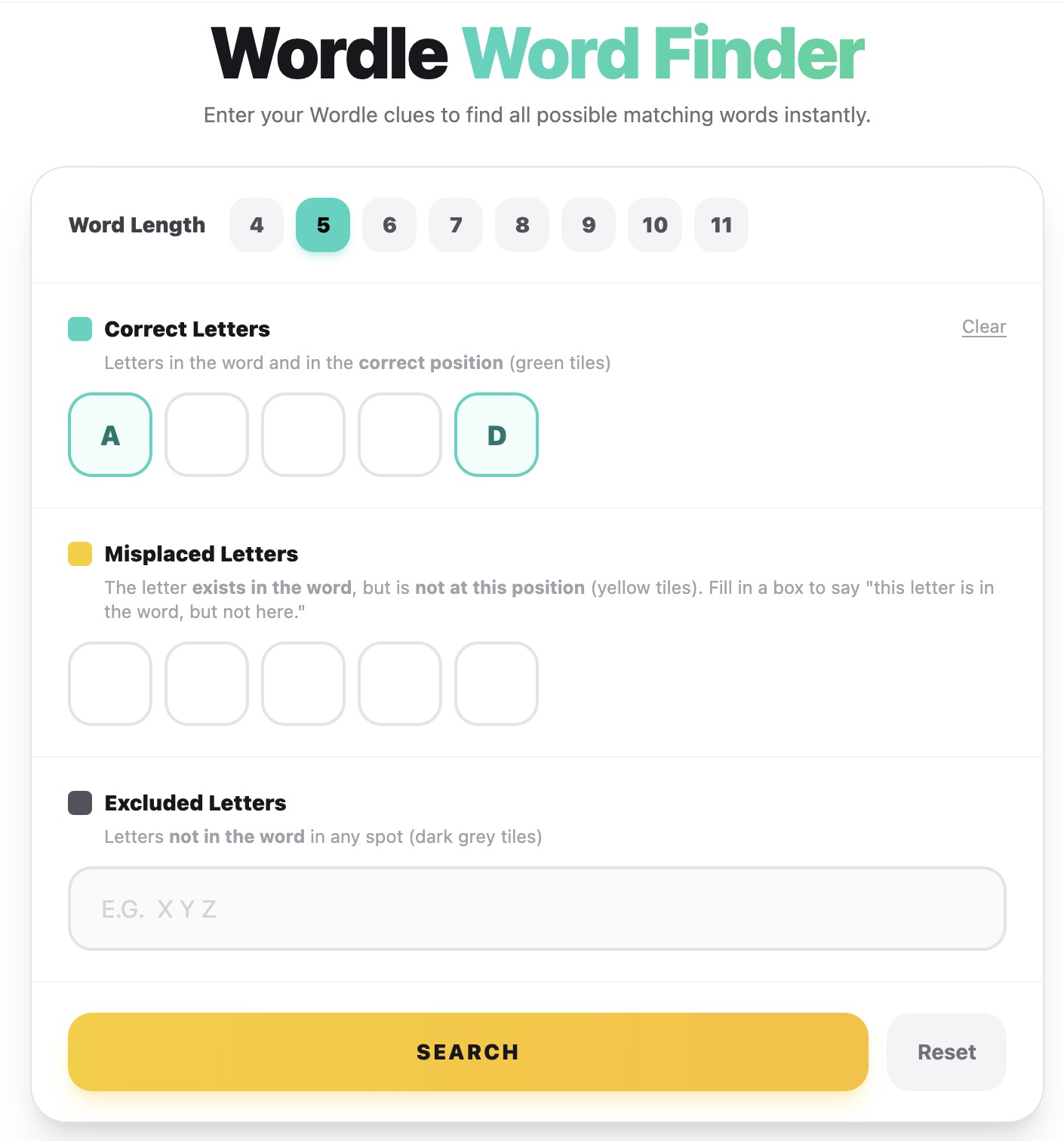
Whether you're a casual player enjoying wordle free play during breaks or a dedicated wordle unlimited enthusiast tackling multiple puzzles daily, mastering the word finder can transform your gaming experience. This free word puzzle tool eliminates frustration while helping you learn new words and strategies.
Why Use Word Finder in Wordle Unlimited Free Play
The word finder tool offers tremendous value for wordle unlimited players at every skill level. Unlike guessing randomly in your wordle free play sessions, this free word puzzle helper uses systematic pattern matching to find all possible solutions based on your current clues.
Many wordle unlimited veterans incorporate the word finder into their regular wordle free play routine. This free word puzzle tool helps you learn which words exist within specific patterns, expanding your vocabulary while reducing time spent on difficult puzzles.
Benefits of Using Word Finder for Wordle Unlimited
Step 1: Select Your Word Length
When you open the word finder tool for wordle unlimited, the first step is choosing the correct word length. Wordle free play offers puzzles from 4 to 11 letters, so select the length matching your current free word puzzle challenge.
The word finder supports all wordle unlimited word lengths. Whether you're playing standard 5-letter wordle free play or tackling extended challenges, this free word puzzle tool adapts to your needs instantly.
Step 2: Enter Green Letters (Correct Position)
Green letters in wordle unlimited indicate correct letters in the correct position. In your wordle free play, enter these letters into the corresponding boxes in the word finder. This free word puzzle tool uses green letters as fixed anchors in the pattern matching process.
Pro Tip for Wordle Unlimited: Only enter green letters where you're absolutely certain of the position. During wordle free play, if you think a letter might belong elsewhere, leave that box empty and use the yellow letter section instead.
Step 3: Enter Yellow Letters (Wrong Position)
Yellow letters exist in the word but not in the position shown during your wordle free play. The word finder for wordle unlimited treats yellow letters specially—this free word puzzle tool knows these letters must appear somewhere in the solution, just not where you placed them.
When using word finder in wordle free play, enter yellow letters in the positions where they were marked yellow. The free word puzzle algorithm automatically searches for words containing these letters in different positions.
Step 4: Enter Gray Letters (Excluded)
Gray letters don't appear in the wordle unlimited solution at all. Enter all gray letters from your wordle free play into the excluded letters field. This free word puzzle filter dramatically reduces the result count by eliminating impossible words.
The excluded letters feature is crucial for wordle unlimited efficiency. During intense wordle free play sessions, entering every gray letter ensures the word finder shows only viable solutions for your free word puzzle.
Understanding Word Finder Results
After entering your clues and clicking search, the word finder displays all matching words for your wordle unlimited puzzle. Each result in this free word puzzle tool represents a valid solution based on your wordle free play inputs.
The word finder highlights letters matching your green and yellow clues, making it easy to compare options during wordle free play. This visual assistance in the free word puzzle tool helps you quickly identify the correct answer.
Free to use for wordle unlimited
Results for any wordle free play puzzle
Letter lengths in this free word puzzle
Pro Tips for Wordle Unlimited with Word Finder
Maximize your wordle free play success by using the word finder strategically. This free word puzzle helper works best when you've gathered substantial clues through regular wordle unlimited gameplay first.
- 1 Use After 2-3 Guesses: Wait until you have some clues in wordle free play before consulting the word finder
- 2 Learn From Results: Study the word finder output to improve future wordle unlimited guesses
- 3 Verify All Clues: Double-check your inputs in wordle free play for accurate free word puzzle results
- 4 Practice Regularly: Use word finder consistently in wordle unlimited to develop pattern recognition
Example Wordle Unlimited Walkthrough
Let's walk through a complete wordle free play example. Suppose your wordle unlimited puzzle shows: S is green in position 1, T is yellow in position 2, and you've eliminated A, E, R, O, I, N during wordle free play.
In the word finder, you'd enter: S in position 1 (green), T in position 2 (yellow), and AEROIN in excluded letters. This free word puzzle configuration might return words like STYMY, STYMY, or other matches for your wordle unlimited game.
Conclusion
The word finder tool revolutionizes how you approach wordle unlimited challenges. By mastering this free word puzzle helper, your wordle free play sessions become more productive, educational, and enjoyable. Whether you're a beginner or veteran player, the word finder enhances every wordle unlimited experience while helping you develop better word puzzle strategies for free play gaming success. For unlimited tool access, consider our Pro or Elite plans.